One of the things I’ve always loved about Linux compared to Windows is the simplicity of updates. On most Linux distros, you can update literally everything — the OS and every installed application — in one go. A single click, one terminal command, and you’re done. No digging through individual apps, no separate update checkers, no guesswork.
Surprisingly, Microsoft seems to be taking a step toward that convenience.
The latest Windows 11 preview build suggests that Microsoft is experimenting with a new Settings page that lists all apps needing updates and lets users update them all from one place.
If it works the way Linux users are envisioning, this could be a major quality-of-life upgrade for Windows.
⭐ Microsoft May Finally Let Us Update Apps Through a Single Page
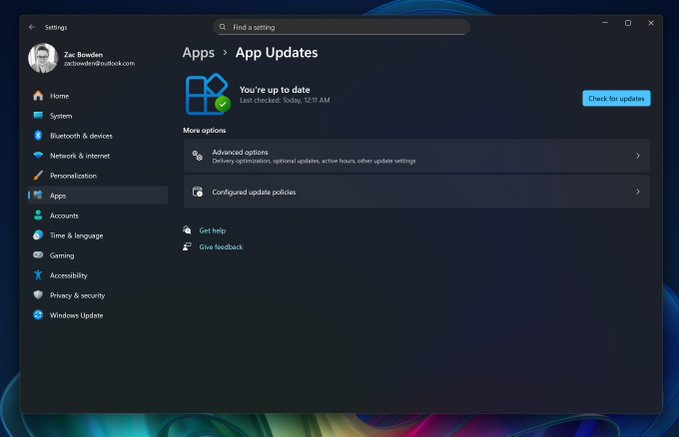
According to Windows Central, the newest Windows 11 Insider build includes an early version of an “App Updates” page under Settings. It doesn’t function yet — it might be a placeholder, an unfinished feature, or something Microsoft accidentally pushed out before hiding it — but its existence is promising.
Based on the screenshot, the page resembles:
- KDE Discover on Linux
- Google Play’s “App updates” section
- A basic package-manager-style update overview
It includes:
- A clear status tracker showing whether updates are available
- A timestamp for when updates were last checked
- A large “Check for updates” button
- Several options for customizing update behavior
For anyone who’s ever wished Windows handled updates in a more centralized, less fragmented way — this is very, very good news.
⭐ The Real Question: Will It Update All Apps, or Just Microsoft Store Ones?
Here’s where my excitement turns into mild dread.
This tool will be game-changing only if it works with apps installed outside the Microsoft Store. For example:
- Steam games
- Adobe apps
- Browsers
- Third-party utilities
- Open-source software
A true, system-wide updater would bring Windows closer to the Linux ideal, where package managers and software centers keep everything updated seamlessly.
But realistically?
There’s a good chance the feature will only support Microsoft Store apps.
If that’s the case, it’s still convenient — but nowhere near transformative.
I would absolutely love to be proven wrong here.
⭐ If It’s Store-Only, Don’t Panic — There Are Benefits to Using the MS Store
If the update tool ends up requiring the Microsoft Store for app updates, it’s not the end of the world. In fact, installing apps through the MS Store does offer some advantages:
Pros:
- Easy automatic updates
- Sandboxed, more secure installations
- Cleaner uninstall behavior
- Fewer bundled installers or adware
- Seamless syncing across devices
But, of course, there are downsides:
- Not all developers publish to the Store
- Some Store versions lag behind their standalone counterparts
- Store installation can be restrictive
- Certain apps behave differently compared to their non-Store versions
So while a Store-powered app update page would still be helpful, it wouldn’t solve Windows’ biggest issue — the lack of a unified, system-wide update manager.
⭐ Final Thoughts
If Microsoft truly wants to embrace the flexibility and convenience users enjoy on Linux, this new unified update page could be a major step forward. It’s still early, it’s still not functioning, and we still don’t know how comprehensive it will be — but the signs are promising.
Whether it becomes a full app-agnostic updater or another Store-limited feature remains to be seen. But at the very least, it shows Microsoft is finally listening to long-standing user feedback.
Let’s hope the final version delivers what Windows users have been requesting for years.